In programmatic advertising, every impression matters. illumin’s integration with DoubleVerify (DV) Post Bid Measurement helps marketers spend smarter by ensuring ads are viewable, fraud-free, and placed in safe environments.
With real-time insights into viewability, invalid traffic, and audience verification, DV Post Bid Measurement gives marketers the data they need to make better decisions. The result is greater transparency, stronger ROI, and campaigns that consistently reach the right audience at the right time.
Campaign design considerations
Enable DV Post Bid Reporting on new or existing Open Web campaigns. Optionally, combine Post Bid Reporting with Viewability Targeting. This combination lets advertisers choose ad placements before bidding, based on predicted viewability scores. This helps optimize campaigns for high-viewability impressions but does not include post-bid measurement.
Go to the Settings panel and click the Measurement menu link. Switch on the Post Bid Measurement toggle to open the settings window.
If you're working at the campaign level, select a tactic and click the Targeting tab. Scroll down the page, locate the Viewability row, and click the pencil icon. A side panel displays. Uncheck the box next to Keep journey targetings settings. Then click the DoubleVerify tile.
Now you can enable Viewability Targeting for the tactic without Post Bid Reporting. Note this option comes with a reporting limitation. If you enable DV Viewability Targeting without enabling Post Bid Measurement (see below), illumin's predefined DV Integrated Metrics report does not display any post-bid metrics.
Steps to configure campaign-level settings
On the Settings page, you have two implementation options: Post Bid Reporting with Viewability Targeting and Post Bid Reporting only. Both options have the same CPM.
DV Post-Bid Reporting with Viewability
This option includes all the features noted below plus viewability insights, which measure:
- Whether the ad was in-view (e.g. at least 50% of the ad visible on screen for 1 second or more, per MRC standards).
- The time the ad spent in view, providing a deeper understanding of engagement potential.
- Additional metrics like viewable CPM (vCPM), helping advertisers evaluate performance based on impressions that could make an actual impact.
This enhanced reporting is critical for advertisers focused on ad visibility and engagement. It confirms the publisher served the ad and the target audience had an opportunity to view the ad.
DV Post-Bid Reporting Only
This option provides baseline metrics related to ad delivery and performance after the ad has been served. It focuses on verifying parameters like:
- Whether the ad was served in a brand-safe environment.
- Detection of fraudulent or invalid traffic.
- Compliance with geographic and contextual targeting.
It ensures advertisers know their ads met basic delivery criteria, but it doesn't dive into whether users actually saw the ads.
Configuring viewability standards
If you select the post bid + viewability targeting option, the window unhides a series of configuration options. Scroll through the window and configure the settings that apply to this campaign.
First, select the creative types that you want to monitor. Each creative type has a different CPM.
Customizing settings
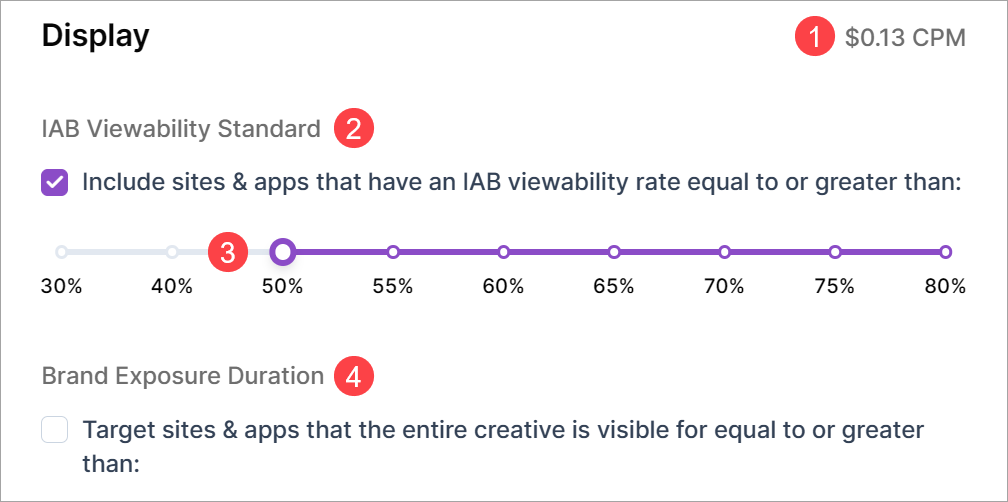
- CPM: The cost to monitor the creative.
- IAB Viewability Standard: If this box is checked (the default setting), DV only includes sites and apps that have a viewability rate that equals or exceeds the lowest selected rate on the sliding scale. If you uncheck the box, your ads will run on all inventory.
- Slider: Use the slider to increase or decrease the minimum rate. Generally, the lower the viewability rate, the broader the inventory pool becomes, as ads are served across placements with both high and low visibility. That means you might have more wasted impressions, but you could also expand your campaign reach.
- Brand Exposure Duration: This feature is disabled by default. If enabled, DV targets sites and apps that accept your minimum required exposure. Required exposure means the minimum amount of time a creative is viewable on screen. The time range for display ads is 5 to 15 seconds. The unit of measurement for video is 10% to 40%. Longer exposures can contribute to awareness goals but can also reduce inventory options.
Opening a report
To review results, go to the Predefined Reports page and open a report. There are two DV Post Bid Measurement options.
- DV Viewability Trends: Track how your campaign’s viewability changes over time. Use filters for inventory or creative type to spot trends and improve your strategy.
- DV Inventory Performance: View detailed metrics on how each site and app meets viewability and performance standards. Identify low-performing sites and easily block them to keep your campaigns on high-quality platforms.
FYI, the DV Integrated Metrics report provides performance data if you enabled the targeting tool that I mentioned at the top of this article. That report includes key metrics like Gross Ads, GIVT Ads, Measured Impressions, and Viewable Impressions.
FAQs
What is DoubleVerify Post Bid Measurement in illumin?
DoubleVerify Post Bid Measurement verifies ad quality after delivery by reporting on viewability, fraud, and brand safety. It confirms whether ads run in safe environments and meet delivery standards, which helps marketers validate spend quality and diagnose issues such as low-quality inventory or unexpected performance drops.
Where can marketers enable DV Post Bid Measurement?
Marketers enable DV Post Bid Measurement from the Settings panel under Measurement at the advertiser or campaign level. The setting applies to Open Web campaigns on the Canvas, and it can also apply at the tactic level for more granular control.
What is the difference between DV Post Bid Reporting and Viewability Targeting?
DV Post Bid Reporting measures quality after an impression serves, while Viewability Targeting filters inventory before bidding based on predicted viewability. Viewability Targeting alone does not produce post-bid metrics, which can limit reporting when marketers troubleshoot issues like a journey not spending.
When should marketers use DV Post Bid Reporting with Viewability?
Marketers use DV Post Bid Reporting with Viewability when visibility and engagement matter. This option adds metrics such as in-view time and viewable CPM, which helps teams optimize toward impressions that users have a real chance to see, not just impressions that technically serve.
Which reports show DV Post Bid Measurement results?
DV Post Bid results appear in predefined reports such as DV Viewability Trends and DV Inventory Performance. These reports show viewability over time, site-level performance, and quality signals, which support decisions like blocking low-performing inventory or adjusting targeting thresholds.